
حل واتساب CRM — شريك Meta الرسمي
واتساب CRM رقم 1 في مصر والوطن العربي — حوّل كل محادثة لصفقة مغلقة
وقّف خسارة العملاء بسبب الرد البطيء والمتابعة الضائعة. SkyCRM هو واتساب CRM الوحيد المبني أصلاً للفرق العربية — شات بوت يفهم كل اللهجات، خط مبيعات متكامل، وتحليلات فورية تُظهر لك بالضبط أين تأتي إيراداتك.
الإجابة المباشرة
أنت تحتاج WhatsApp CRM عندما تتجاوز المحادثات اليومية أسلوب الهاتف الواحد، وتحتاج الإدارة إلى رؤية أوضح للردود والمتابعة والحسابات.
آخر تحديث
٢٤ مارس ٢٠٢٦
تمت المراجعة بواسطة
فريق سكاي ويف التحريري التشغيلي
- هذه الصفحة تشرح متى تصبح طبقة CRM ضرورية فوق المحادثات نفسها.
- تمت مراجعة الصياغة لربط الصندوق المشترك والحسابات المتعددة والإدارة التشغيلية بوضوح.
حقائق CRM السريعة
هذه الحقائق تلخص ما تضيفه طبقة CRM فوق واتساب نفسه.
صندوق وارد مشترك
نعم
المحادثات تنتقل من الهاتف الفردي إلى مساحة تشغيل يراجعها الفريق والإدارة.
عدة حسابات
مدعومة
يمكن ربط أكثر من رقم واتساب داخل نفس مساحة العمل حسب الخطة.
سياق العميل
مرئي
الملاحظات والبحث والسجل تبقى داخل الواجهة بدل التشتت بين الموظفين.
الحوكمة
موجودة
الأدمن يراقب الحدود والمخاطر وحالة الاشتراك بدل العمل العشوائي.
ميزة تشغيلية 1
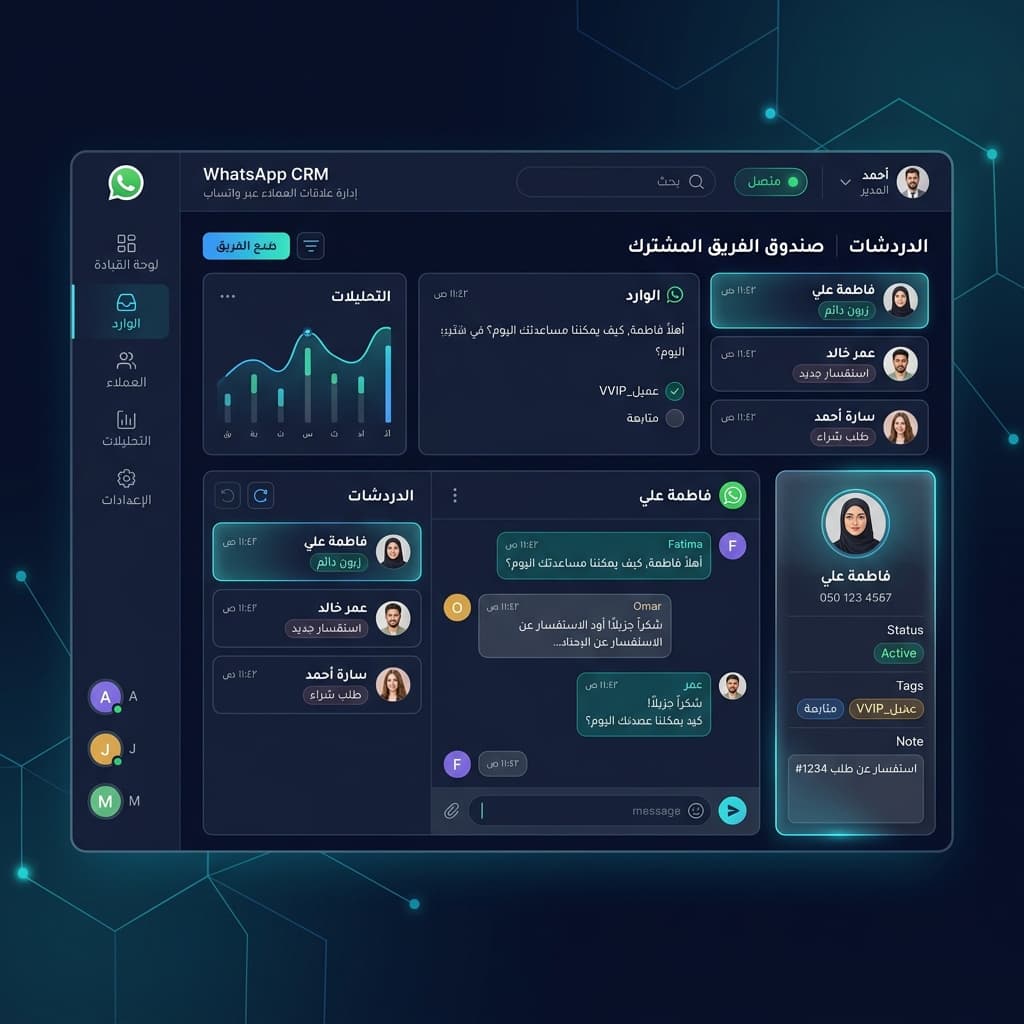
صندوق وارد موحد متعدد الحسابات — أدر كل أرقام واتساب من لوحة تحكم واحدة مع عدادات للرسائل غير المقروءة
ميزة تشغيلية 2
تاريخ عميل كامل — كل رسالة، مكالمة، ملاحظة، وسم، وتاريخ شراء قابل للبحث في ثوانٍ
ميزة تشغيلية 3
تصنيف تلقائي للعملاء بالذكاء الاصطناعي — أعلى قيمة العملاء يُرد عليهم أولاً دائماً
ميزة تشغيلية 4
خط مبيعات بالسحب والإفلات — شوف كل صفقة من التواصل الأول لتأكيد الدفع
ميزة تشغيلية 5
تحليلات الفريق الفورية — وقت الاستجابة ومعدل التحويل وإيرادات كل موظف في شاشة واحدة
ميزة تشغيلية 6
متابعة تلقائية — ضبطها مرة واحدة وتتابع إلى الأبد بدون تدخل
ميزة تشغيلية 7
تقسيم العملاء وبث مستهدف — أرسل العرض المناسب للشخص المناسب في الوقت المناسب تماماً
ميزة تشغيلية 8
أكثر من 100 تكامل — Shopify وWooCommerce وSalesforce وHubSpot وOdoo وGoogle Sheets وبوابات الدفع
متى يكون واتساب CRM مناسبًا؟
عندما يرد أكثر من موظف على نفس الرقم، أو تحتاج الإدارة إلى رؤية أوضح لحمل الرسائل والمتابعة وجودة الرد.
متى لا تحتاجه بعد؟
إذا كان التشغيل ما زال على شخص واحد ورقم واحد، ولا توجد حاجة لسجل واضح أو توزيع أو رقابة إدارية.
ما النتيجة العملية؟
ينتقل واتساب من أداة محادثة فردية إلى نظام عمل فيه بحث وسجل وملاحظات وحدود وتشغيل واضح للفريق.
أسئلة حل الـCRM
أسئلة عملية قبل اعتماد واتساب كـ CRM
هذه الإجابات تخدم الفرق التي تقارن بين الدردشة العادية وبين تشغيل واتساب كقناة عمل حقيقية.
لا. هو مناسب أيضًا لفرق الدعم والعيادات والوكالات وكل نشاط يحتاج سجلًا أوضح للمحادثات وتوزيعًا أفضل للرد والمتابعة.
أول فائدة عملية عادة هي وضوح المحادثات غير المقروءة، ومن يرد على ماذا، وما الذي يحتاج متابعة بدل الاعتماد على ذاكرة الموظفين أو الهاتف الشخصي.
نعم. السعة تعتمد على الخطة النشطة، ويمكن تشغيل عدة أرقام داخل نفس مساحة العمل مع فصل واضح بين الحسابات.
غالبًا يجب تثبيت طبقة الـCRM أولًا، لأن الأتمتة تعمل أفضل عندما تبنى فوق سجل محادثات واضح ومساحة عمل منظمة.
صفحات مرتبطة بحل واتساب CRM
بعد فهم حل الـCRM نفسه، هذه هي الصفحات التي تكمل قرار العميل: المنتج، الأسعار، والمقارنة.
المقارنة
واتساب بيزنس أم CRM؟
لفهم الفرق العملي بين التطبيق العادي ونظام التشغيل الكامل.