

أتمتة واتساب بالذكاء الاصطناعي — وفّر 40+ ساعة أسبوعياً
خلّي الذكاء الاصطناعي يتعامل مع 90% من استفسارات عملائك — فريقك يُغلق الصفقات مش يكتب ردوداً
محرك الأتمتة الذكي في SkyCRM يشتغل 24/7 عشان فريقك ما يضطرش. الذكاء الاصطناعي يتولى التحيات والأسئلة الشائعة وأسئلة المنتجات وحجز المواعيد وتحديثات الطلبات بعربية سليمة وطبيعية — ثم يُحوّل لإنسان فقط لما يكون في قرار حقيقي محتاج. النتيجة: ردود أسرع، عملاء أسعد، وفريق يركز على الإغلاق مش على الكتابة.
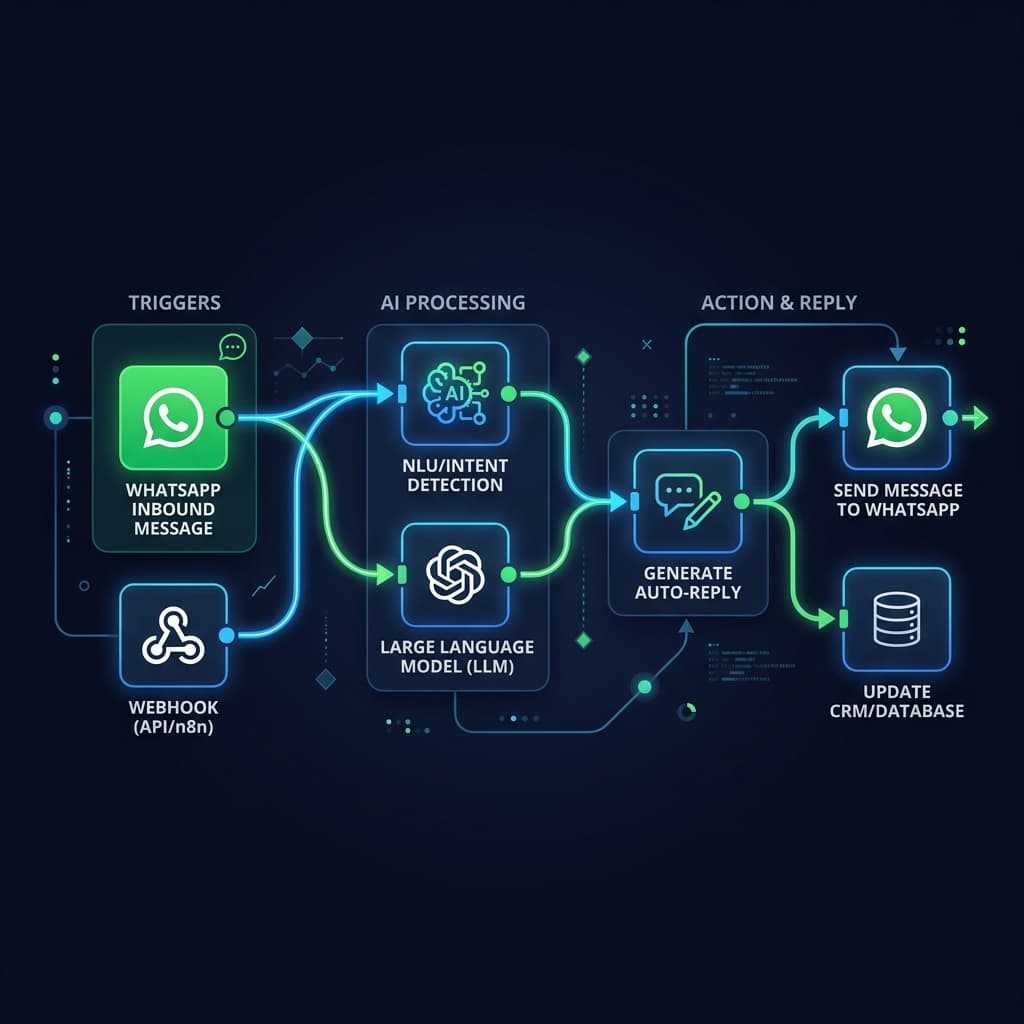
متى تبدأ الأتمتة؟
ابدأ الأتمتة عندما تتكرر نفس الردود أو خطوات التأهيل أو التحديثات الداخلية، لكن بعد أن تكون طبقة الـCRM واضحة ومنظمة.
آخر تحديث
٢٤ مارس ٢٠٢٦
تمت المراجعة بواسطة
فريق سكاي ويف للأتمتة والمحتوى
- هذه الصفحة تركز على توقيت الأتمتة الصحيح وحدودها العملية.
- تمت مراجعة الصياغة لتبقي الداشبورد هو سجل التشغيل الأساسي حتى مع الربط عبر Webhooks وAPI.
حقائق الأتمتة السريعة
هذه الحقائق توضح معنى الأتمتة داخل المنصة دون وعود مبالغ فيها.
نقطة البداية
Meta webhook
الرسائل الواردة يمكن أن تدخل من webhook مع بقاء اللوحة هي السجل التشغيلي.
الربط الخارجي
Webhooks/API
يمكن ربط workflows خارجية عند الحاجة دون فقد رؤية المحادثة داخل الداشبورد.
التحكم البشري
مستمر
الهدف ليس استبدال الفريق، بل تقليل التكرار مع بقاء المتابعة البشرية ظاهرة.
أفضل وقت للبدء
عند التكرار
ابدأ عندما تتكرر نفس الردود ونفس التحديثات ونفس خطوات المتابعة.
مسار أتمتة 1
شات بوت واتساب بالعربية — صوت وكتابة — يفهم المصري والخليجي والشامي والمغربي بشكل طبيعي
مسار أتمتة 2
ردود تلقائية فورية في أقل من 3 ثواني — قبل ما أي منافس يقرأ الرسالة أصلاً
مسار أتمتة 3
تسلسلات محادثة ذكية بأزرار وقوائم واتساب — يقود عميلك من الاستفسار للشراء تلقائياً
مسار أتمتة 4
أتمتة حجز المواعيد — المرضى والعملاء يحجزون ذاتياً 24/7 بدون تدخل بشري
مسار أتمتة 5
تحديثات حالة الطلبات والشحن تلقائياً — خلّص 80% من رسائل 'فين طلبي؟'
مسار أتمتة 6
متابعة عربة التسوق المهجورة — يتابع تلقائياً مع عملاء ما أكملوش الشراء
مسار أتمتة 7
تسليم سلس من الذكاء الاصطناعي للموظف البشري — لما الـ AI يكتشف موضوع حساس يُحوّل فوراً مع السياق الكامل
مسار أتمتة 8
تكامل مع Meta webhook لمعالجة الرسائل الفورية ودعم أتمتة سير العمل
متى تكون الأتمتة منطقية؟
عندما تتكرر نفس الأسئلة أو خطوات التأهيل أو التحديثات الداخلية أكثر من مرة يوميًا.
متى لا تكون الأولوية الآن؟
إذا كان الفريق ما زال يحتاج أولًا إلى تنظيم الصندوق الوارد وتوزيع المحادثات قبل إضافة أتمتة خارجية.
ما القاعدة الصحيحة؟
الأتمتة يجب أن تخدم الداشبورد، لا أن تستبدله. المصدر الأساسي للمراجعة يجب أن يبقى واضحًا داخل المنصة.
أسئلة الأتمتة
إجابات عملية قبل ربط الأتمتة بواتساب
هذه الأسئلة تعالج التوقيت الصحيح وحدود الأتمتة وما إذا كان الفريق جاهزًا أصلًا للربط.
ليس بالضرورة. الأتمتة قد تبدأ بإشعارات داخلية أو تحديثات حالة أو dispatch عبر Webhooks، بينما يبقى الرد البشري ظاهرًا داخل لوحة المحادثات.
عندما لا يزال الفريق يعاني من فوضى في توزيع المحادثات أو غياب سجل واضح للعميل. في هذه الحالة يجب ترتيب طبقة الـCRM أولًا.
نعم، المنتج مبني بحيث يستقبل webhook من Meta ويمكنه إرسال dispatch إلى الأنظمة الخارجية عبر Webhooks مع بقاء الداشبورد هو الواجهة التشغيلية الأساسية.
الشكل الصحيح هو أتمتة تقلل التكرار وتدعم القرار البشري، لا أتمتة تعزل الفريق عن المحادثات أو تخفي ما يحدث داخل النظام.
صفحات مرتبطة بحل الأتمتة
الأتمتة لا تعمل وحدها. هذه الصفحات توضح المنتج الأساسي وسياق المحادثات وخطط التفعيل المناسبة.
حل الـCRM
راجع حل واتساب CRM
للتأكد أن طبقة السجل والإدارة واضحة قبل إضافة workflows.
التواصل
ابدأ التفعيل مع سكاي ويف
عندما تكون جاهزًا لمراجعة إعدادات Meta والربط عبر Webhooks وخطة التشغيل.